Senin, 31 Mei 2010

Portable Funduc Search and Replace v6.4 : Mencari dan Mengganti Teks Langsung


Download

Search and Replace is an award winning, easy to use search and replace utility loved by programmers, webmasters, and novice computer users alike.

Search and Replace looks through multiple files for a string and can also replace it with another string. It can search subdirectories and ZIP files and do case sensitive or insensitive searches. Extensive support for grep style regular expression search & replacements includes operations that span more than one line, incrementing number replacements, and inserting the path & filename in replaced files. Binary search & replace is also available. You can specify multiple include/exclude file masks and filters based on file date & size. Control over replacements includes configurable replacement prompts and a display of replacements before they are made. An easily understood script editor makes frequent &/or complex multi-step search/replace operations easy to prepare. Advanced script operations include a boolean expression evaluator for added control over which files will be processed by the script. The internal context viewer allows you to edit text files. An "HTML Mode" makes plain text -> html character code substitutions. You can also "Touch" files (change time/date stamp). Search and Replace automatically detects if the file being searched is text and can be configured to launch with separate external editors for search hits in text vs. binary files. The program can also launch associated programs on "found" files, e.g., launch your web browser if the search hit occurs in an .htm or .html file.

If you need to find and replace text, or just find text, this utility is a must have. It is significantly faster than other Windows grep-only utilities and allows replacing for the same price as those programs which offer only grep capabilities.

Search and Replace is for Windows NT/2000/XP, Windows 2003, and Windows Vista. 32-bit and x64 versions are available.

Here are some of the basic features of Search and Replace. A history of features by version and an overview of proposed new features are also available.
+ Search and replace operations can be case sensitive or not, they can span multiple files via multiple file masks and filter settings, and they can span more than one line
+ The program can search-replace the Windows Clipboard. You can also do simple searches in the Search Results list (press F3) and you can also limit follow-up search &/or replace to only those files currently listed in the Search Results list.
+ Unicode files are detected automatically for search and replacing.
+ Scripts can be applied to Search/replace strings in the Binary Mode dialog. This allows special processing of RTF codes, HTML codes, Unicode files, with a lookup table created by the user along with several supplied by us.
+ Output in the Search and Replace "Results List" can be sent to your printer, saved to a file (your choice of delimiters), or viewed in your web browser via an automatically generated htm file. If you have a color printer you can print the html file to obtain a color coded output.
+ File operations can be carried out on the files in the search results list.
+ An HTML Mode that automatically makes plain text -> html special character substitutions during search &/or replace operations.
+ The internal "context" viewer allows you to view your search results in context with the surrounding text. You can jump from one "search hit" to the next and edit text files. Search and Replace automatically detects if the file being searched is text and, if not, will automatically view binary files using our freeware companion utility HexView. Alternatively, Search and Replace can be configured to launch with separate external editors for search hits in text vs. binary files. Links off the External Editors page provide information for using TextPad (Helios Software, www.textpad.com), Multi-Edit (American Cybernetics, www.multiedit.com), UltraEdit (IDM Computer Solutions, www.ultraedit.com), Hex Workshop (BreakPoint Software, www.bpsoft.com) and 'frhed' (Raihan Kibria, www.tu-darmstadt.de/~rkibria).
+ Search and Replace can also launch associated programs on "found" files, e.g., launch your web browser if the search hit occurs in an .htm or .html file.
+ Text files can be reformatted w/ word wrap at a specified column.
+ Text can be prepend or appended to a file.
+ An 'Ignore Whitespace' function can find a phrase regardless of where line breaks may lie.
+ The program can read the environment variables on the host computer and use them in a search/replace using the "%%envvar=" syntax. For example, the 'temp' environment variable can be referred using the string "%%envvar=temp%%".
+ Replacements, including those in script and binary operations, can be visualized in context before they are made.
+ You can (optionally) write files changed by a replacement operation to a backup directory and preserve original file time/date stamps during replacements.
+ Regular Expression operators include the basic grep-style substring and match operators, along with special replacement operators such as case change operators, file and path name replacements, counters, and binary mode operators. The Incrementing Counter operations let you allow you to quickly revise a sequence of numbers in one or more files or add numbers where no numbers exist originally. (See Regular Expressions English or Deutsch).
+ Scripts let you specify multiple search/replace combinations, save a particular search or replace string for later use, or process multiple drives/directories and/or file masks. Advanced Script Settings let you control program options, embed comments in scripts, and further specify the files processed during a script operation via a boolean expression evaluator. When building scripts you can easily add the the Search/Replace & Mask/Path values from the mail dialog by holding down the CTRL key while clicking on the Insert or Remove All buttons in the script editor. (See Script Editor page). Scripts include an iterative operator to repeat a script a specified number of times.Binary Mode search and replace lets you process binary files &/or text files with special characters such as tabs, line feed, carriage returns. (See Binary Editor Page).
+ Multiple include & exclude file masks let you, for example, search all ".htm" & ".html" files except the ".htm" files begin with "s" or "t". You can also create complex file masks to include some subdirectories while excluding others. Filter Options allow you, for example, to include only files created after a set date that are smaller than the size you specify.
+ Searching can be halted after the first hit in a file - useful for when you have to search large or many files. A 'no replace' flag is also available to turn off replacement functions - useful for administrators or users who need extra limits on the possibility of inadvertent replacements.
+ Scripts can be applied to the Search &/or Replace strings in advance of an operation. Activated via the Apply Script function, you can, for example, use a conversion script to deal with the plain text equivalents of html special characters or rtf 'escape' codes.
+ User control over replacement prompts/warnings includes one string at a time, one file at a time, all at once (no warnings), and combinations in between such as skipping all remaining occurrences in a file.
+ An enhanced "Touch" dialog allows you to change time/date stamp and attributes of files.
+ Search and Replace can be launched from Windows Start-Find Menu. Files &/or directories dropped from Explorer or File Manger into the Search and Replace main window are automatically recognized for processing. The Windows Explorer shell extension lets you launch Search and Replace on a specific file or group of selected files.
+ An 'UnDo' function is available to reverse the last search-replace (see F1 Hlp).
+ Search ZIP files without manually extracting files first.
+ User configurable fonts & colors.
+ Command line support (14 functions) includes control over most program options & ability to run search & replaces via batch files.
+ Help file includes many examples.
+ An established, mature program with a history of regular updates and solid support.
+ Much more...

Homepage http://www.searchandreplace.com

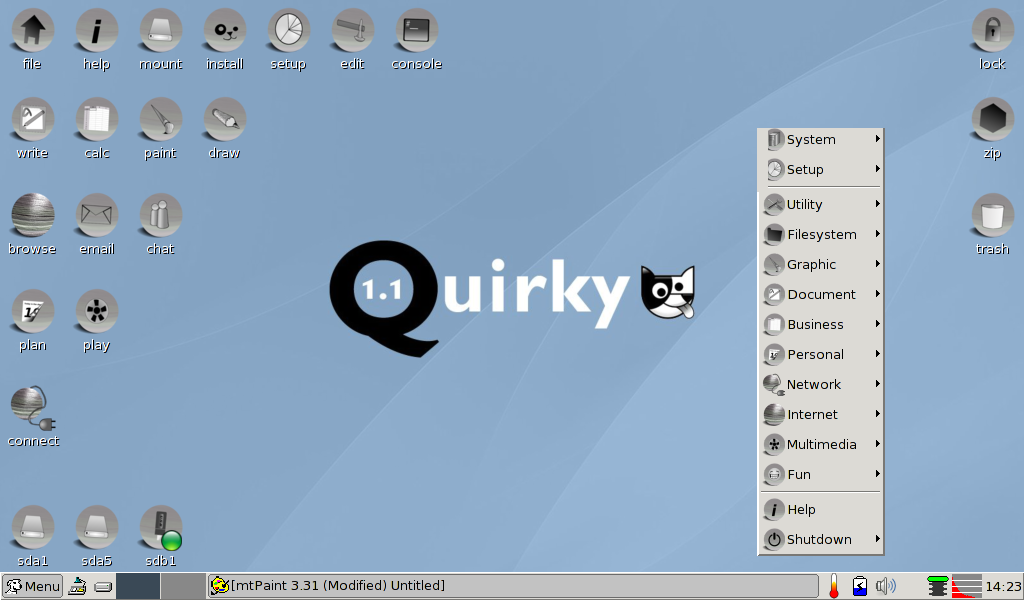
Quirky dan Lupu : Puppy Linux Baru Arabic Enabled

Beberapa minggu yang lalu alif tanpa sengaja mendapatkan kecepatan akses di warnet yang begitu cepat (200-500 Kbps), sehingga dalam beberapa menit saja mampu mendownload Quirky dan Lupu, Puppy Linux Baru yang dibangun dengan aplikasi Woof. Setelah mencobanya satu-satu denngan bantuan Linux Live USB Creator, ternyata keduanya sudah mendukung key Arabic, sehingga mampu membaca dan menulis huruf Arab dengan cukup sempurna. Saya sangat suka dengan kecepatan Quirky, tapi saya juga suka dengan kestabilan Lupu. Keduanya mampu untuk membuat dan menampilkan macam-macam dokumen (termasuk pdf dan rtf), melihat film, membuat dan edit gambar, mempartisi hardisk dengan mudah, dan bisa boot dari USB.

Lupu on my Netbook :


Quirky on my Netbook :


Photoshop Portable Fractalius Plugin Include : Melihat Keindahan Lain Dari Sebuah Gambar

Tanpa sengaja alif menemukan sebuah plugin menarik untuk Photoshop, sehingga bisa membuat sebuah gambar terkesan aneh namun sangat indah....bagaikan masuk meneyelami sebuah dunia baru dari alam gambar itu menuju alam...FRACTALLLL...


Download Photoshop Portable Fractalius Plugin Include

Selasa, 25 Mei 2010

BigOven Deluxe Inspired Cooking : Sedia 20.000 lebih Resep Masakan Enak


Download
Mirror

Award-winning recipe software – BigOven Deluxe Inspired Cooking is the only cookbook and recipe organizer software to link to an online recipe archive that is constantly expanding. The program offers all of the features to inventory your own collection and gives you access to recipes from thousands of home cooks. Printing options are limited, but if you’re looking for recipes and meal management this is the one.

A program for cooks, beginner to expert, complete with more search functions and recipes than any other software with more than 20,000 recipes. This is a recipe database software and has a tutorial included to show how to use it, If you need it.

Get your recipes organized! :
* Enter your own recipe collection quickly and easily
* Import recipes to your PC or post to the web with a single click
* Drag and drop recipes to create shopping lists sorted by aisle!
* Use the integrated calendar to plan meals for weeks or even months in advance
* Generate grocery lists for any date range you choose
* Resize recipes easily!
* Calculate calories, carbs, fat… for any recipe!
* Easily search, print, email recipes in your collection… much more!
* Complete with 0ver 40,000 Recipes + Web access to over 160,000 more.
* BigOven for Windows, featured in PC World, Real Simple, and Smart Computing Magazines.
* Import files in MMF, MXP, MX2, Cook’n, and other recipe formats.
* Free Palm OS and Windows Mobile companions let you bring your recipes and shopping lists with you.

Paragon Drive Copy Personal 9.5 build 9409 + Boot CD : Memindah Data dan OS Dengan Mudah


Download :

Paragon Drive Copy Personal 9.5 build 9409 x86

Paragon Drive Copy Personal 9.5 build 9409 x64

Boot CD Or Here

Create a virtual clone of your PC, including operating system, drivers and settings, all your applications and files. Save it to the USB hard drive and use it on another computer, just as if you’re working from your own PC. Use Drive Copy Personal to easily migrate to new hard drive or even different hardware without reinstalling, create backup images of your hard drive, and perform basic partitioning operations and even more.

Learn how to make your system mobile with Drive Copy 9.5:
Create a virtual clone on your PC. Including operating system, drivers and settings, all your applications and files.
You can choose the format of your virtual environment. Choose format you prefer –VMWARE or MS Virtual PC. New users can download a virtual player from the official site of preferred vendor for free.
Save a virtual clone of your PC to a USB hard drive. Save a virtual player on the same disk as well and use your PC anywhere.

Your PC is in your pocket now! Plug your USB drive to other computers, install a virtual player there and use your PC anytime you need it.

Key and New Features:
Windows 7 Support (32/64-bit). Accomplish any operation under Windows 7.
Refined User Interface. Improved two-level user interface (Easy/Advanced) to satisfy the needs of every customer.
Support for major virtual machines. MS Virtual PC, VMware Workstation, VMware Fusion.
Wide migration options. Migrate to another hard drive, migrate to different hardware, migrate to virtual machine, migrate your Apple hard drive.
P2V Copy. Migrate a Win2K+ physical system to a virtual environment.
P2P Adjust OS. Make OS start up after unsuccessful migration with 3rd party tools.
Smart Driver Injector. Make the process of adding new drivers smooth and easy.
Simple Backup and Restore Wizard. Make the process of adding new drivers smooth and easy. Create compressed image of your hard drive or partition.

Dr.Web LiveCD 5.0.3 | 125 MB : Membersihkan Virus dan Merawat PC


Dr.Web LiveCD will clean your computer of infected and suspicious files, help you copy important information to a removable data storage device or another computer, and then attempt to cure infected objects.
How does it work?

1. Download the Dr.Web LiveCD image.

2. Burn the image onto a CD/DVD. Users of Nero Burning ROM should proceed as follows:
· Insert a blank CD/DVD into your CD/DVD recorder
· Click on the “File” menu and select “Open”
· Browse through folders to the image location and select it
· Press the “Burn” button, and wait while the image is being written to the disk

3. Make sure that the CD/DVD drive or any other device with Dr.Web LiveCD is set as the first-boot device. Adjust corresponding BIOS settings, if necessary.

4. As loading starts, a dialogue window will prompt you to choose between the standard and safe modes.

5. Use arrow keys to select a desired mode and press [Enter]:
· If you want to use the scanner with the GUI, choose DrWeb-LiveCD (Default)
· If you’d like to start the scanner using the command line (console), select DrWeb-LiveCD (Safe Mode)
· Choose Start Local HDD, if you want to boot from the hard drive instead of Dr.Web LiveCD
· Select Testing Memory to launch the Memtest86+ utility

6. If DrWeb-LiveCD (Default) is selected, the operating system will detect all available disk drives automatically. It will also try to connect to the local network, if available.

7. When the system is loaded, check the disks or folders you want to scan, and click on “Start”.

In case your system is infected with malware and rendered non-bootable, Dr.Web LiveCD is here to help you restore it!
Requirements:

· i386 processor
· Minimum 128 MB of RAM (64MB to load in safe mode)
· a CD-ROM, DVD-ROM or flash drive with minimum 128 MB of free space

Download Links
HOTFILE.COM
http://hotfile.com/dl/44609318/c882395/minDrWebLiveCD-5.0.3.part1.rar.html
http://hotfile.com/dl/44609332/8185dfe/minDrWebLiveCD-5.0.3.part2.rar.html

UPLOADING.COM
http://uploading.com/files/7e9c3d53/minDrWebLiveCD-5.0.3.part1.rar/
http://uploading.com/files/a9636868/minDrWebLiveCD-5.0.3.part2.rar/

Lingobit Localizer Enterprise v6.0.6002 : Menerjemahkan Software Ke Bahasa Ibu Pertiwi Masing-masing


Download Hotfile
Mirror 1
Mirror 2

Lingobit Localizer - is a one-stop localization tool for MFC, .NET, Delphi and Java based applications, that simplifies localization, shortens time-to-market and saves money. It extracts localizable resources from your application and makes it easy to translate, check and preview translation. When translation is ready Localizer creates localized version of your application. No source code changing is required. Localization can be done in-house or delegated to another company. In the latter case, translation tasks are distributed via self-extracting localization kits with a project file (no source-code) and a ‘lite’ edition of Localizer for translators. When you release new version of your software, old translations are automatically merged with resources from the next version and you'll only need to translate new and changed content. Lingobit Localizer is a perfect software localization tool that supports localization of several development platforms allowing translator to change text, position and other localizable parameters.
- C++, Win32 and MFC localization
- .NET localization
- Borland Delphi & CBuilder localization
- Java localization
- XML
- Text-based files (*.ini, *.cpp, *.txt)

Lingobit Localizer simplifies communication and workflow throughout the entire localization process by offering users a unified interface and productivity tools, such as Automated QA, Validation Expert, Translation Memory, etc. Lingobit’s project monitoring tools give a localization manager the ability to see what is going on at each stage of the localization process, which ensures accountability, gives clarity and control to efficiently manage localization across several steps.

Key features:
- Automatic Validation
- Exchange Wizard
- Translation Re-use
- Pseudo Translate
- Vesion Control
- Translation Memory
- and more...

Lingobit Localizer
- .NET 3.0 Windows Presentation Foundation (WPF) Localization
- Database Localization
- .NET WinForms editor for 3-rd party components
- Visual Preview for HTML, XML, text-based and picture files
- XPath filtering for XML
- Encoding settings for text-based formats

Homepage - http://www.lingobit.com/products/index.html